01
Broad search
Lemur
Around 121,382 images
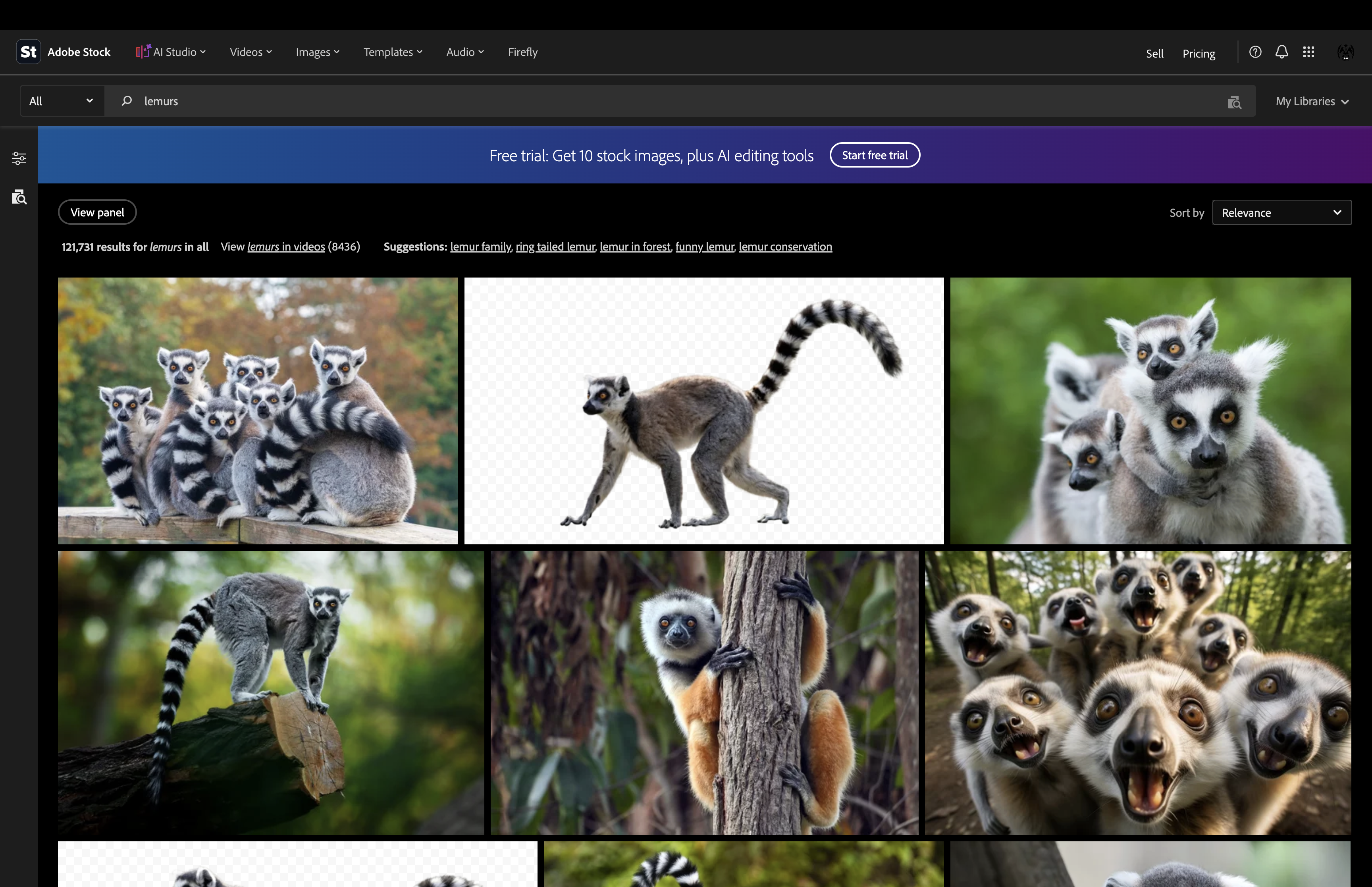
I then filtered the results to 'photographs' rather than 'all image types' That reduced that to roughly 72,115.
Metadata Matters
KEYWORD STRATEGY
THE INVISIBLE LANGUAGE THAT SELLS STOCK PHOTOGRAPHY
The best stock photograph in the world is worthless if nobody ever sees it. Keywords may feel like unnecessary admin, but they are one of the main bridges between your photograph and the buyer trying to find it.
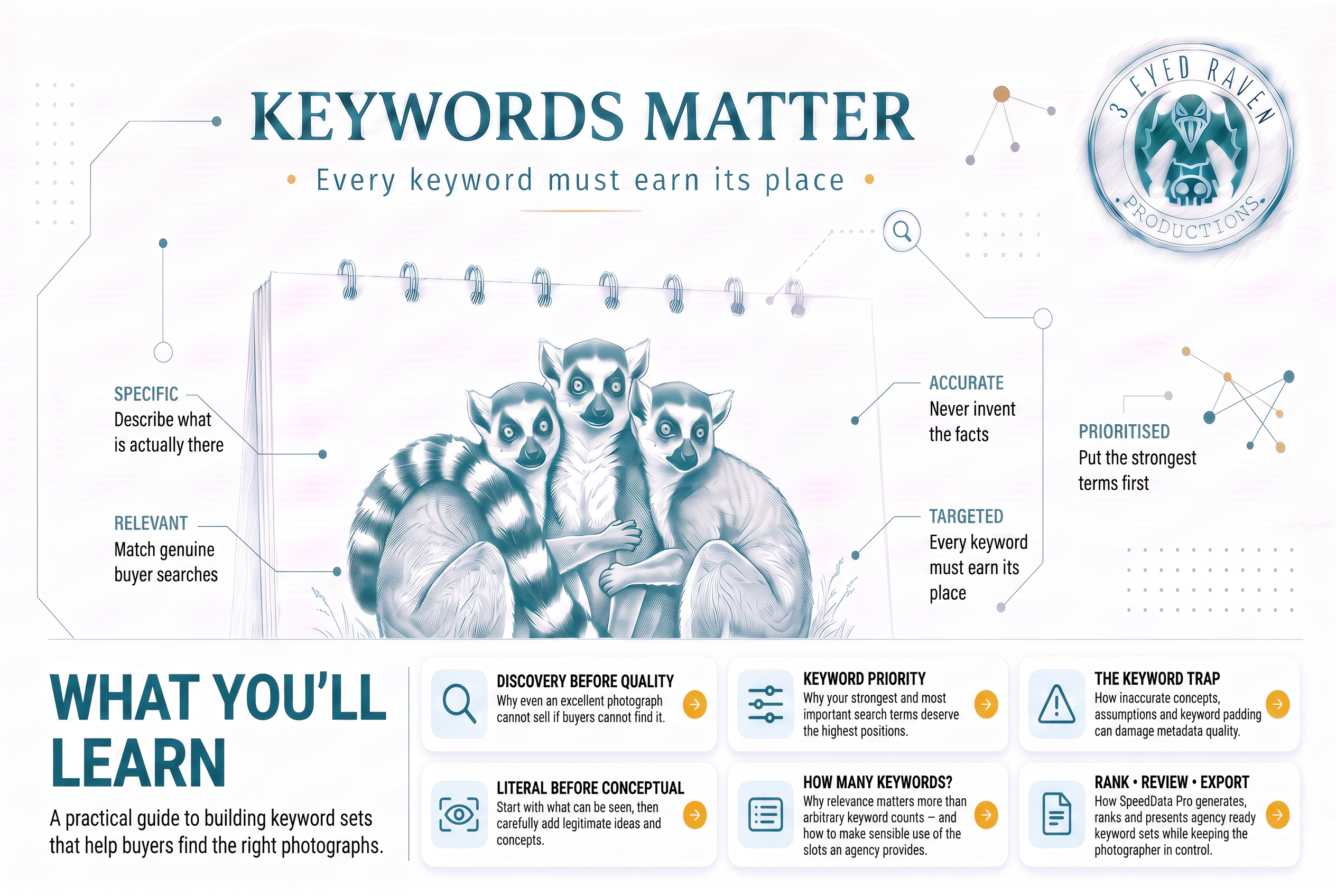
Jump straight to the topics that interest you, or follow the edition from beginning to end.
The invisible language that sells stock photography
Let’s start with a slightly uncomfortable truth.
We’ve all spent hours perfecting a photograph. Waiting for the right light. Choosing the right lens. Adjusting the composition by a few inches. Removing distractions in Photoshop. Tweaking colours until everything feels just right.
We can be oh-so-very patient when it comes to taking our photographs.
But when it’s finally time to upload and tag them, are we really quite so patient?
Do we really sit there mulling over all the keywords we could use, or shouldn’t use, carefully considering the merits of each one and methodically ranking them according to their relative importance?
If you do, then I take my hat off to you.
Because I know I’ve been guilty of doing exactly the opposite.
Just get it done. That’ll do. Get it out of the way. NEXT! Thank God, they’re finally submitted.
Perhaps I am entitled to a little metadata fatigue.
I worked it out recently. Before we developed SpeedData Pro, I had personally manually tagged more than 38,400 individual stock assets.
Yes, some images were processed in batches. Yes, keywords were copied from one photograph to another. But therein lies part of the problem.
Stock agencies don’t want endless near-duplicates. In my early, wet-behind-the-ears contributor days, I received a very stern warning from Adobe Stock after submitting too many 'similar images' with similar metadata. It went so far as to warn me that I could lose access to my account if I did it again.
That wake-up call made me think much more critically about what I was uploading and how I was describing it. It was probably also influential in the design and direction of the AI photography toolkit we are developing today.
So, if two photographs are different enough to justify both being submitted, there’s a pretty good chance their most effective keyword lists won’t be completely identical either.
Copying and pasting gets the job done.
It doesn’t necessarily get the best job done.
The shortcuts are understandable. Keywording isn’t why most of us picked up a camera in the first place.
Photography is creative. We didn’t develop a burning desire to make pictures because secretly we wanted to describe every one of them using 50 carefully selected words.
Keywords feel like admin.
Sometimes very tedious admin.
Sometimes, if we’re honest, a rather laborious, pointless and thankless task.
But then somebody buys one of your photographs.
That buyer may love the image when they see it, but the stark truth is that without the words you attached to help them find it, they might never have seen it at all.
The clue really is in the name.
You Can't Buy What You Can't Find
Spend any time in stock photographer forum worlds such as Reddit and Quora, or Shutterstock and Adobe Stock Contributor Facebook groups, and you'll find plenty of great advice and certainly some very firmly held opinions about keywords.
I know. I’ve gone looking for them myself.
One of the most commonly held beliefs is that an experienced photographer is automatically the best person to keyword their own images.
I’m not entirely convinced.
Not because photographers don’t understand their pictures.
Sometimes the problem is that we know too much about the picture.
We know where we were, why we were there, what happened five minutes before we pressed the shutter and what we were trying to achieve when we took the shot.

Take these photographs, all accepted into our Shutterstock, Adobe Stock and Pond5 portfolios. They were shot just after the Covid lockdown restrictions began to ease.
As the photographer, I remember that it was the first time we’d been able to travel out of our local area for months. People were still having to follow social distancing rules. Friends were finally allowed to be outside in groups of 6. I also remember waiting patiently for these groups to leave the frame because we could only model-release ourselves and didn’t want to be ‘caught’ in a shot breaking the rules by being too close to another group.
Looking at the files, I originally included covid-related keywords including social distance, safe, wellness, wanderlust and achievement. They reflected both the circumstances in which the photograph was taken and, frankly, the fact that I had already had some of my editorial social distancing photographs bought and published on BBC news webpages. I was keen to capitalise on that and document as much as I could.
So at that time, the pandemic was central to the purpose of the shoots.
Five years later, a buyer may not need to know the circumstances in which the shoot took place, they may simply need a photograph of an older woman in walking boots enjoying the countryside. Perhaps to convey the message that it’s never too late to start looking after your health.
That’s why metadata isn’t simply about noting the photographer’s message, intentions or the events being documented.
It’s about describing what is actually in the image and anticipating ways potential buyers may search for it.
That can be quite a mindset shift when you start contributing stock images.
And it leads to another long-standing common belief from the experienced: "If the photograph is good enough, it will sell itself". Hmmmm...will it really?
Discovery before quality
Metadata is the currency that buys visibility in a crowded marketplace.
A perfect photograph is only as valuable as its discoverability.
Keywords convert creative energy into searchable digital assets.
They ensure that artistic genius isn't lost in a sea of millions.
Search technology has become increasingly sophisticated and stock agencies can analyse visual content in ways that simply weren’t possible years ago. We’ve seen quite noticeable advances in image analysis even during the 18 months we’ve spent developing SpeedData Pro.
Contributor metadata (titles, descriptions and keywords) attached to that image gives search systems explicit information about what an asset contains. But it all comes down to this;
The buyer types words.
The search engines scan and filter trying to match the buyer’s words with relevant content.
So even the most beautiful photograph still has to be found, amongst millions of others, by a search engine matching WORDS to WORDS. The sheer beauty of the photograph and the skills of the photographer do not enable it to rise out of the library on merit alone.
So if you have a little shop full of beautiful photographs, and you need the right buyers to find you, even though you are surrounded by huge art warehouses, this is how it works.
Categories bring potential buyers into the neighbourhood where your shop is located.
Keywords lead the potential buyers to your shop front and encourage them to knock on the door because what they’ve searched for suggests you may have the images they need.
The title makes the introduction, draws them inside and starts the sales pitch, quickly confirming that they’ve found what they’re looking for.
The description fills in all the details and does its very best to close the deal.
Then and only then does the photograph stand on its own two feet screaming out from page 1 or page 2 of the search results saying "LOOK AT ME, look how amazing I am!”
That will be the first time your photo has a chance to sell itself!
It’s not a perfect analogy, but it demonstrates the different jobs each piece of metadata performs.
But as always - there is one catch.
Your keywords can also bring the wrong people to your door.
Fifty visitors looking for something you aren't selling aren’t much use.
They’ll glance through the window and walk straight past.
You want buyers who are genuinely looking for the sort of image you actually have.
One Search. Millions of Results.
In our earlier Metadata Basics article, we explored a specific example showing just how dramatically a search can change as more precise terms are added. The images showed autumn leaves reflecting in a hugely popular Welsh reservoir in the Brecon Beacons.
The starting search of 'autumn leaves' returned 14,726,661 results.
By progressively narrowing what we were actually looking for, that enormous collection eventually became just six images - all of which were part of our portfolio.
That stayed with me because it demonstrates something easily forgotten when we’re sitting at home filling in metadata.
Buyers don’t necessarily search once. If the first page of the results are too broad, they refine their search.
They add another detail. Then another. Perhaps a location. An activity. An age group. A colour. A season. A concept.
Every additional piece of relevant information can change which photographs are included in the search.
So I decided to try a similar experiment using our own images with a stock subject that is filled with extremely similar images to see how my keywording was holding up.
The Lemur Keyword Experiment
I used a batch of our ring-tailed lemur photographs that had already been sitting in our Adobe Stock portfolio for several months. The photographs showed lemurs surrounded by grass and leafy trees.
I started very broadly.
Broad search
Broad search
Around 121,382 images
I then filtered the results to 'photographs' rather than 'all image types' That reduced that to roughly 72,115.
Identify the species
Just over 40K
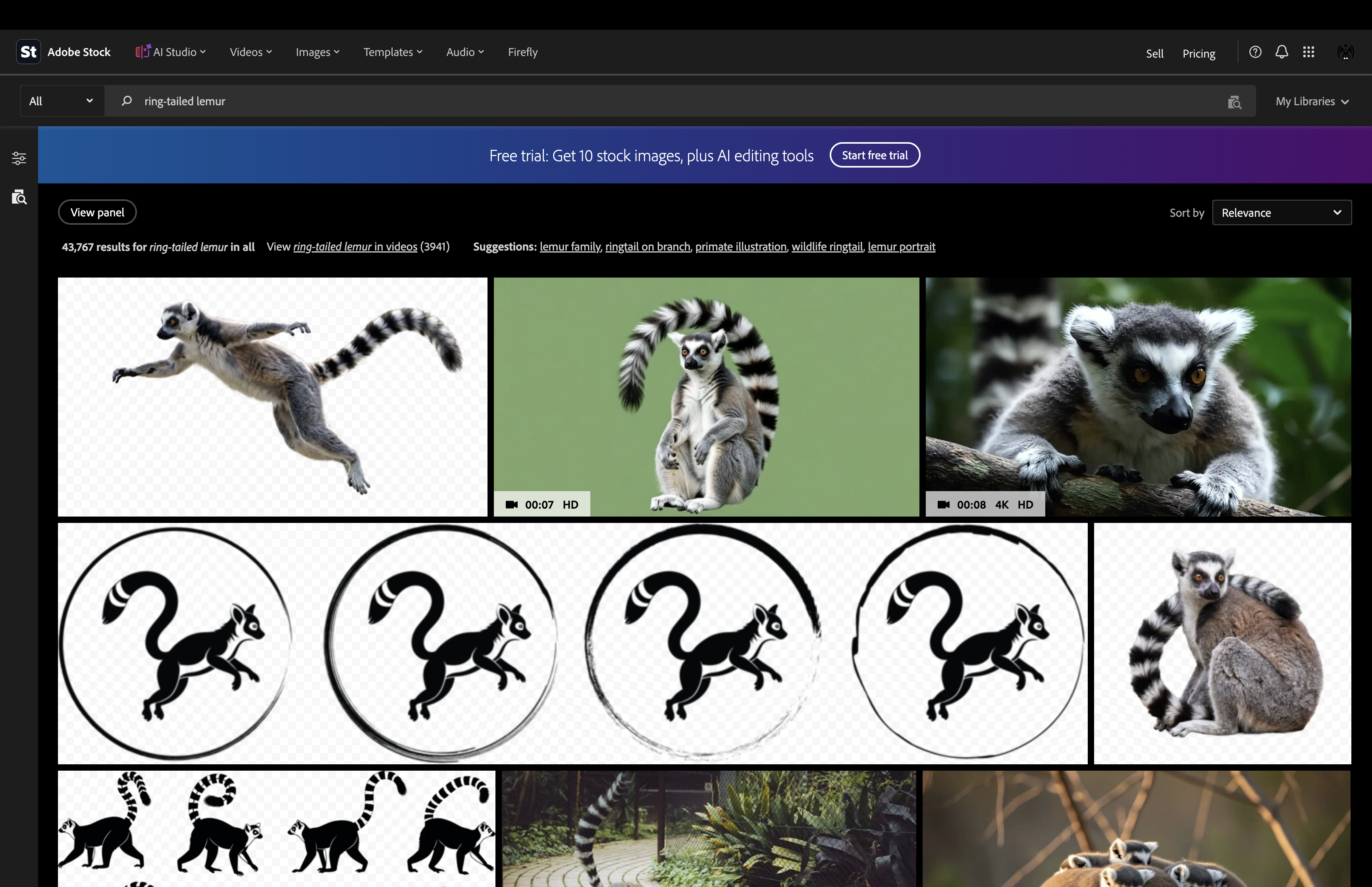
I filtered out images created using generative AI
Remove generative AI
Around 25K
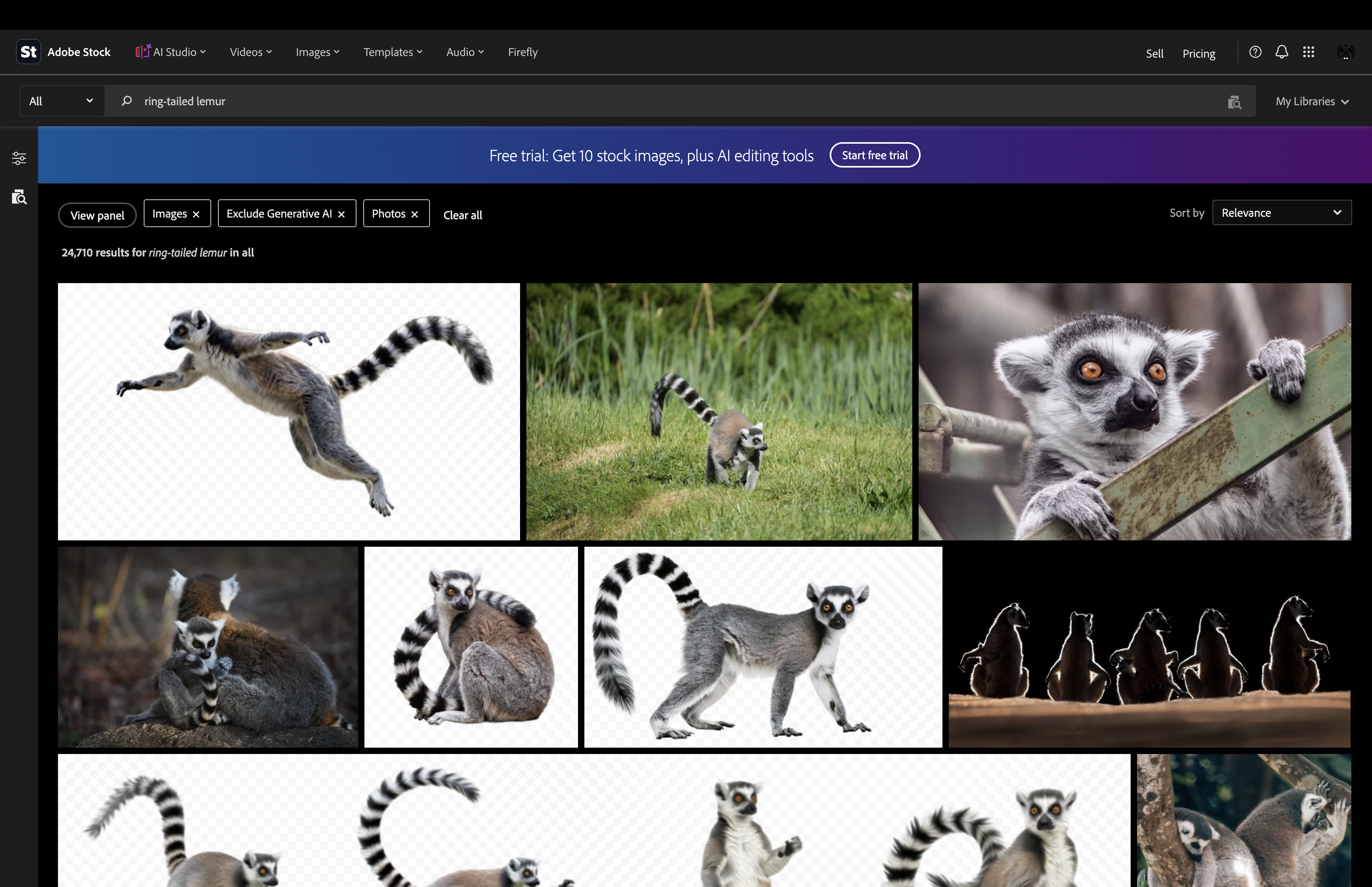
Around 25K remained
Describe the setting
Under 3K
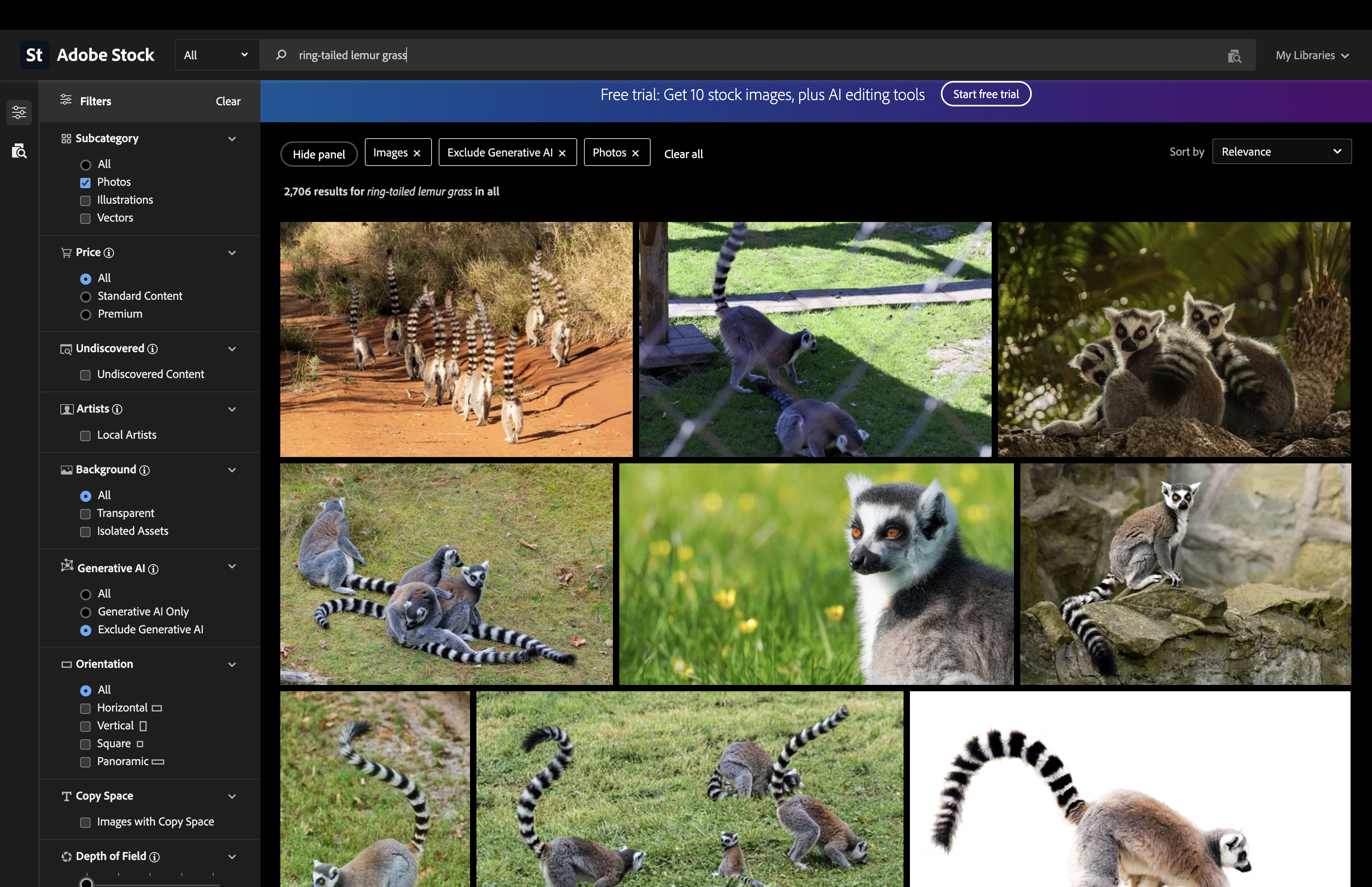
Under 3K
Add behaviour
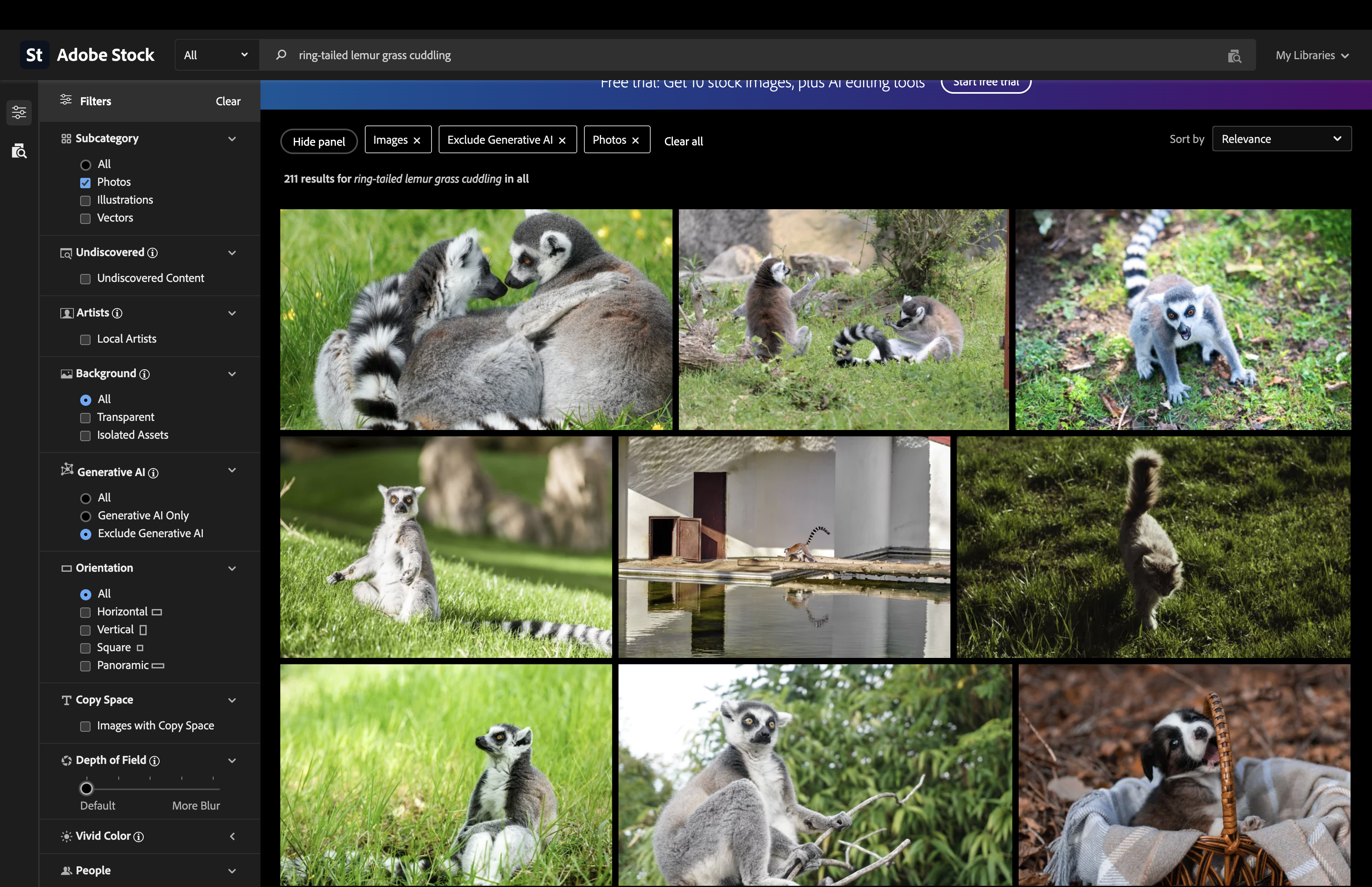
Adding a single word such as cuddling or affectionate, where that behaviour was genuinely visible, brought our images towards the front of the results, sometimes first. Replace cuddling with sleeping and our images disappeared much further back.
Try a concept
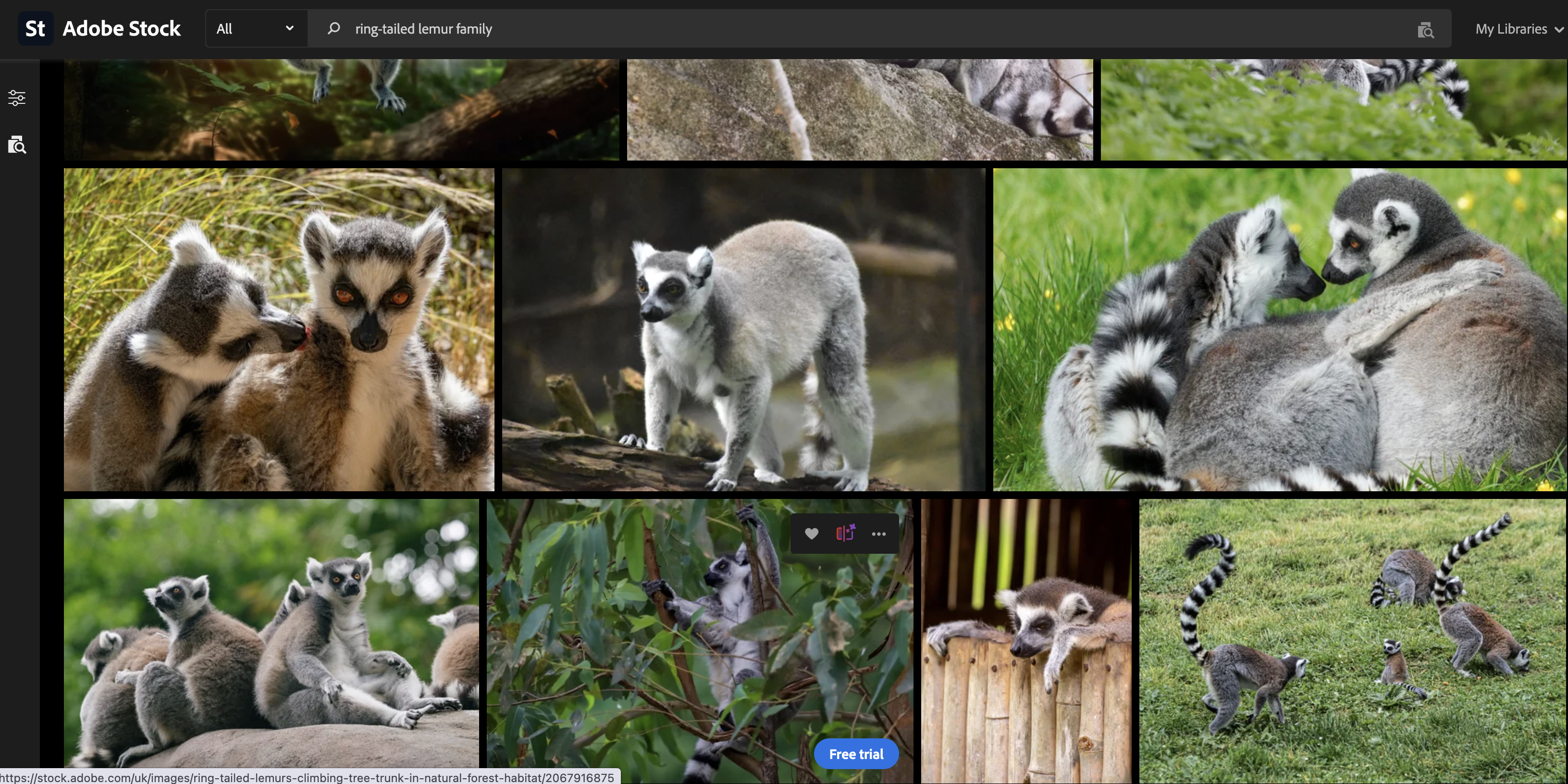
One word had significantly changed which photographs matched the search. I also tried broader conceptual terms such as family. That produced thousands of competing photographs, yet ours still appeared surprisingly prominently.
Search results move. Agencies reorder them. New content arrives. Different filters produce different outcomes. There may also be factors affecting ranking that contributors simply cannot see.
So I’m not claiming that our keywords alone determined where every photograph appeared.
But the experiment demonstrated something much more useful. Our relatively recent lemur photographs could emerge from tens of thousands of competing images as the search became a more accurate description of the setting and action represented in our photographs.
Then I put in one last detail, to see if it had the same effect as our original Brecon Beacons Autumn Leaves experiment in Edition 1.
Many bloggers, travel writers and tourism sites want authentic images from particular places, so I’ve always felt that location information can be worth including where it is genuinely relevant.
Adding a specific location, for example Wales, Folly Farm or Manor Wildlife Park, and the competition changes again.
On Shutterstock, one of our vertical ring-tailed lemur photographs appeared at number one in one of these highly specific searches.
Why that particular image was first is impossible to establish from the search alone. Sales, clicks, orientation, recency and other ranking signals will all have played a part.
But it may be that this was because it was also appearing in Google searches for lemurs at Manor Park.
A Place for 50 Keywords and Every Keyword in Its Place
Spend enough time browsing stock photography forums and you will inevitably encounter disagreement.
Experienced stock contributors, it would seem, love a debate.
You hear one very experienced voice with 100 years’ experience and never made a penny, "You need as many keywords as you can, the more the merrier, you might attract random buyers searching"
Then up pops "You only need five good keywords. That’s it. Any more and you are ignored"
The five good keyword guys usually claim they write their metadata in 30 seconds because those handful of strong keywords are all that really matter.
Well, if you hit the jackpot with those five, I say good luck to you.
But there’s an obvious problem.
Your potential buyer has to search using exactly the routes you have anticipated.
What about another buyer who needs exactly the same photograph for a slightly different purpose and describes it differently?
Or uses a synonym?
Or searches for the activity rather than the person?
Or the concept rather than the object?
So who is right?
Like most long-running arguments in stock photography, I think the sensible answer sits somewhere between the absolutes.
But once you’ve identified those five excellent keywords, what happens if keyword number six is also genuinely relevant?
Why wouldn’t you include it?
What if number 27 accurately describes another aspect of the image?
Or number 44 reflects a legitimate commercial concept?
Or number 50 is a perfectly accurate term that happens to be exactly what one buyer types tomorrow morning?
The important word isn’t fifty.
It’s relevance.
Not filler.
Not spam.
Not just in case.
Relevance.
Every keyword must earn its place.
Same word. Different search systems.
Despite the extensive research we'd already carried out into keywording while developing our photography tools, I decided to revisit the subject from scratch while researching this article.
And I managed to demonstrate one of the problems almost by accident.
I asked Google AI about the old argument over keyword numbers and showed it one of the chapter headings I was considering:
Then I asked a very simple question:
Its answer couldn't have been much more emphatic:
It went on to explain why using as many keywords as possible was supposedly a bad idea, keyword dilution, confusing search engines, spam signals, concentrating on a small number of highly relevant terms.
There was just one problem.
I was talking about stock photography. It wasn't.
I hadn't made that context clear, so Google AI had interpreted my question through the world of general website SEO and digital publishing.
When I clarified that I meant stock photography platforms offering up to 50 keyword slots, its response began:
And that, rather neatly, demonstrates one of the problems with the entire keyword-number debate.
We use the word “keywords” as though it describes the same thing everywhere. It doesn't.
Advice about keywords gets read in the context of Google Search, websites, SEO, social media, Instagram, YouTube or any number of other discovery systems, and then gets repeated somewhere else as though the same rules must apply simply because everybody happens to use the word keyword.
They don't.
A webpage being interpreted by Google's search systems is not the same thing as an individual stock asset sitting inside a searchable commercial image library with dedicated metadata fields.
And Google AI recognised the distinction as soon as I supplied the missing context.
Its revised answer was almost the opposite of the first:
It also made the point that particularly caught my attention:
That's much closer to the argument I'm making here.
But there's an important lesson in Google AI getting the context wrong in the first place.
Never take advice about “keywords” and assume it applies universally.
Before asking how many?, ask:
Only then does the number begin to mean anything.
Which brings us back to the 50 available slots.
I'm not arguing that every photograph must contain exactly 50 keywords.
I'm arguing that an arbitrary number shouldn't stop us while genuinely useful, relevant routes into that photograph still exist.
Keyword Priority
Even when every keyword in a list is relevant, they aren’t necessarily equally relevant.
This photograph is a useful example.
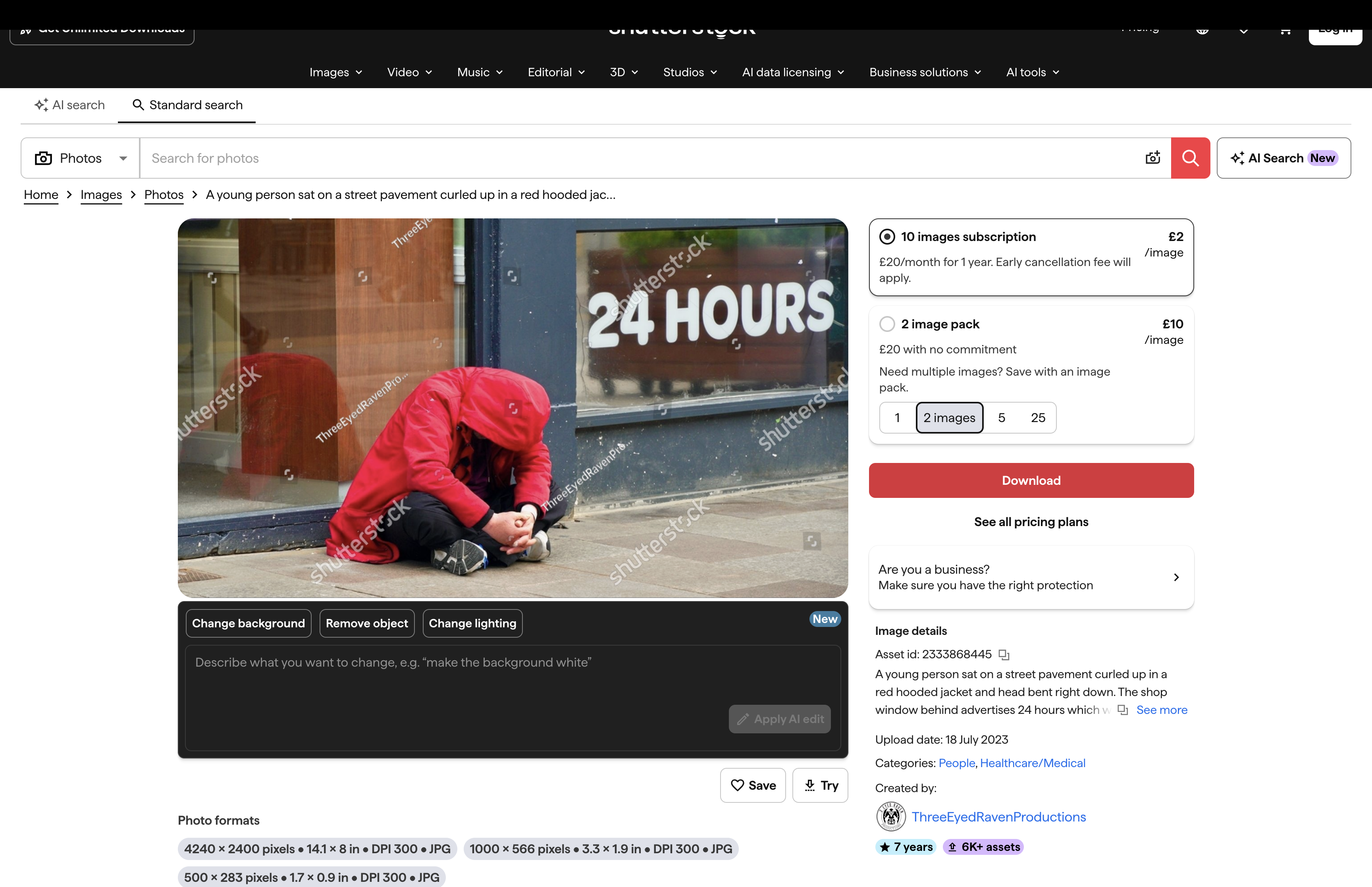
When I took the photograph, I assumed the person may have been homeless. Indeed when I captioned that image several years ago I included homelessness in its keywords
But that was just that, an assumption made by me.
There is nothing in the photograph itself that actually confirms it.
And that distinction matters when we’re creating metadata.
When I put the image through SpeedData Pro, it didn’t make that leap.
Its ten highest-priority keywords were:
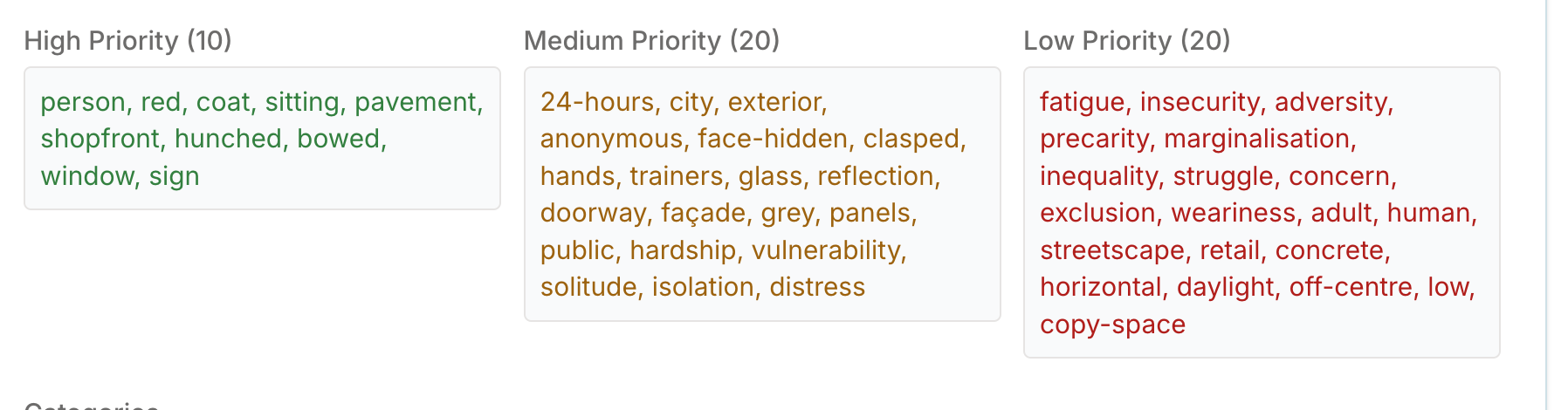
The high-priority terms are remarkably literal.
They describe what can actually be seen rather than trying to invent a story about the person in the photograph.
The next layer begins to add more detail and context.
We move from the principal subject and obvious visual identifiers into surroundings, physical details and, cautiously, some concepts that the photograph might reasonably illustrate.
Then come the lower-priority terms, where the hierarchy becomes particularly interesting.
Retail is there.
There is clearly a retail environment in the photograph. There is a shopfront, window and signage behind the person, so the word has a legitimate connection to what we can see.
But SpeedData hasn’t expanded that into:
shopping · shopper · shopping experience · retail therapy · consumer · consumerism · shopaholic
Why would it?
That’s not what the photograph is fundamentally about.
And this is the difference between recognising something that exists within an image and allowing it to define the image.
A useful keyword hierarchy starts with the strongest evidence.
What or who can I actually see?
Then:
What are they doing?
Where are they?
What else is genuinely present?
Only then should we start moving into context and broader concepts that the photograph might reasonably illustrate.
SpeedData’s result demonstrates that progression rather neatly.
At the top we have person, red, coat, sitting, pavement.
Further down we reach hardship, vulnerability, solitude and isolation.
And lower again we find broader interpretations such as precarity, marginalisation and inequality.
Those later words may have value, but they shouldn’t be allowed to push the fundamental subject matter out of the way.
And there’s another important lesson hiding in what SpeedData didn’t say.
Homeless person isn’t there.
Homelessness isn’t there.
Rough sleeping isn’t there.
I may believe that’s what I photographed. I may even remember circumstances surrounding the photograph that confirm it.
But the image itself doesn’t establish it.
AI shouldn’t turn my assumption into somebody else’s fact.
If I have reliable contextual information that isn’t visible in the pixels, particularly with editorial photography, I can actually provide confirmed factual information that AI can’t verify in vision in SpeedData Pro’s Additional Information box which is then submitted before the metadata is generated.
That gives SpeedData information the photograph alone cannot provide and allows it to use that confirmed context when creating the metadata.
That is precisely why the photographer remains part of the process.
The software can analyse the photograph. The photographer can provide the story behind it
Both matter.
Now in the red-coat photograph, retail is part of the environment. It belongs, but it doesn't define the photograph.
But then there is 24 hours.
Literally, those are simply words on the sign behind the person. But to a buyer, they could open another conceptual route into the image.
24 hours can change everything. A day in the life. 24 hours is a long time. One day out of a lifetime.
Suddenly, something that began as a small visual detail can potentially become part of the photograph’s meaning.
That’s the interesting thing about conceptual keywords. Their importance isn’t necessarily determined by how much space something occupies in the frame.
It's determined by what the photograph can genuinely communicate to a buyer.
Don't Promise Apples When You Are Selling Oranges
The more keywords attached to an image, the more searches it could possibly appear in.
But there is a rather important second half to that argument:
Take this photograph from our destitution portfolio.
Here we know the subject is a homeless man in Cardiff city centre.
Unlike the red-coat photograph above, that isn't an assumption being made from appearance alone. It is confirmed information I can provide as the photographer and is actually confirmed in the sign the homeless man is displaying asking for help.
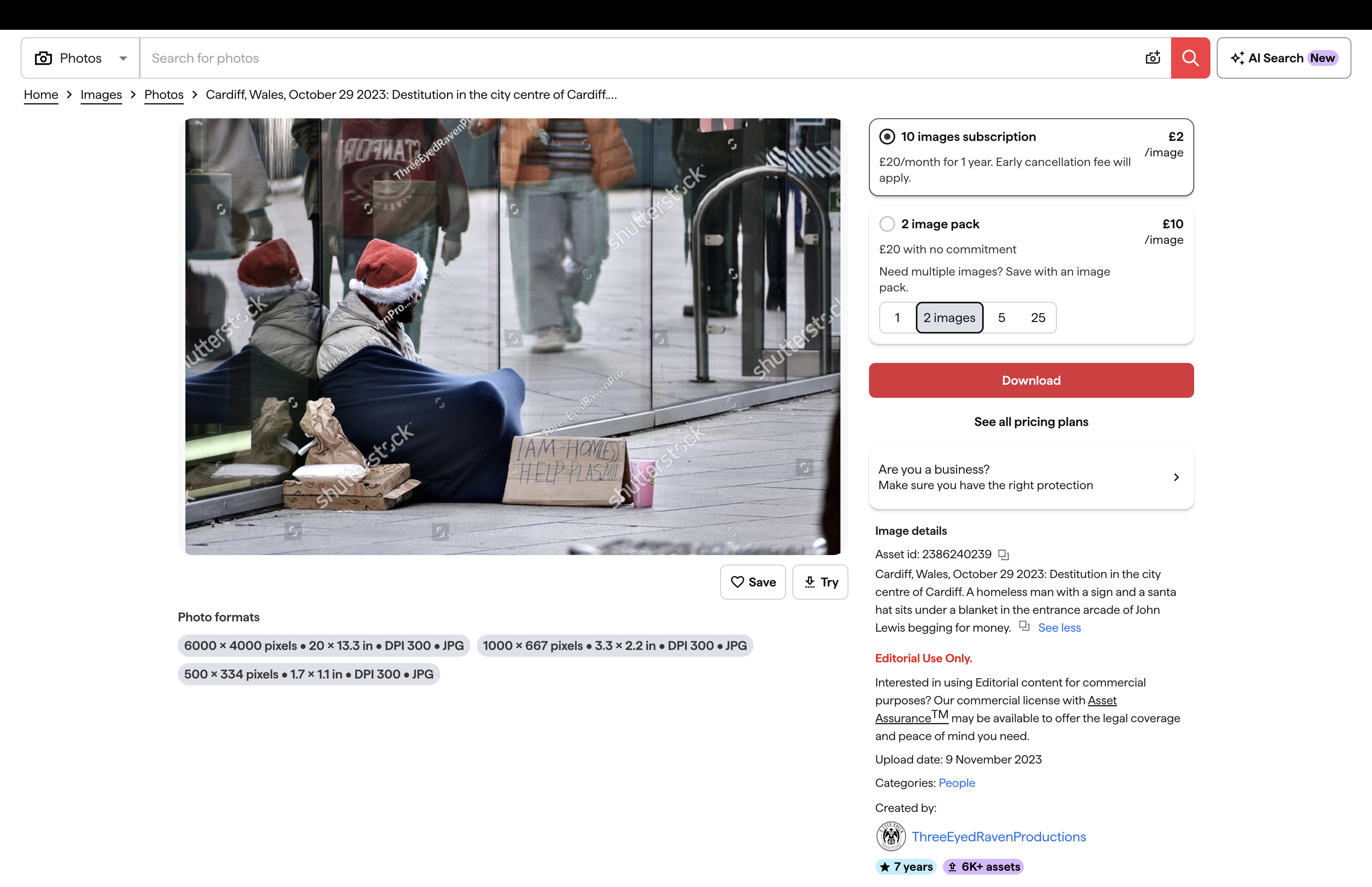
There is clearly retail in the frame.
There are shops, signs and a shop doorway. The photograph was taken in a shopping area.
So retail or shopping district may have some legitimate supporting relevance.
But that doesn't mean we should keep following the retail trail.
It would be very easy to start adding:
shopping · shopper · shopping experience · retail therapy · consumer · consumerism · shopaholic
And every extra word could be defended with roughly the same argument:
Well, there's a shop in the photograph.
But that's precisely where keywording can go wrong.
Something being visible in a photograph doesn’t automatically make every concept associated with it relevant to the photograph.
Imagine the search from the buyer’s side.
A buyer searches for retail therapy.
They are probably looking for photographs about the experience of shopping , people browsing, carrying purchases, enjoying shops, spending money or participating in consumer activity.
Would they reasonably expect this photograph of a homeless man sitting in a shop doorway to appear in those results?
Probably not.
And adding retail therapy hasn't made the photograph more discoverable in any useful sense.
It has simply made it discoverable to the wrong buyer.
That distinction matters.
If the answer is no, the keyword hasn't earned its place.
That doesn’t mean we ignore secondary details.
A shop can be relevant without the photograph being about shopping. A retail environment can be useful context without turning the image into an illustration of retail therapy.
The hierarchy allows us to keep those distinctions.
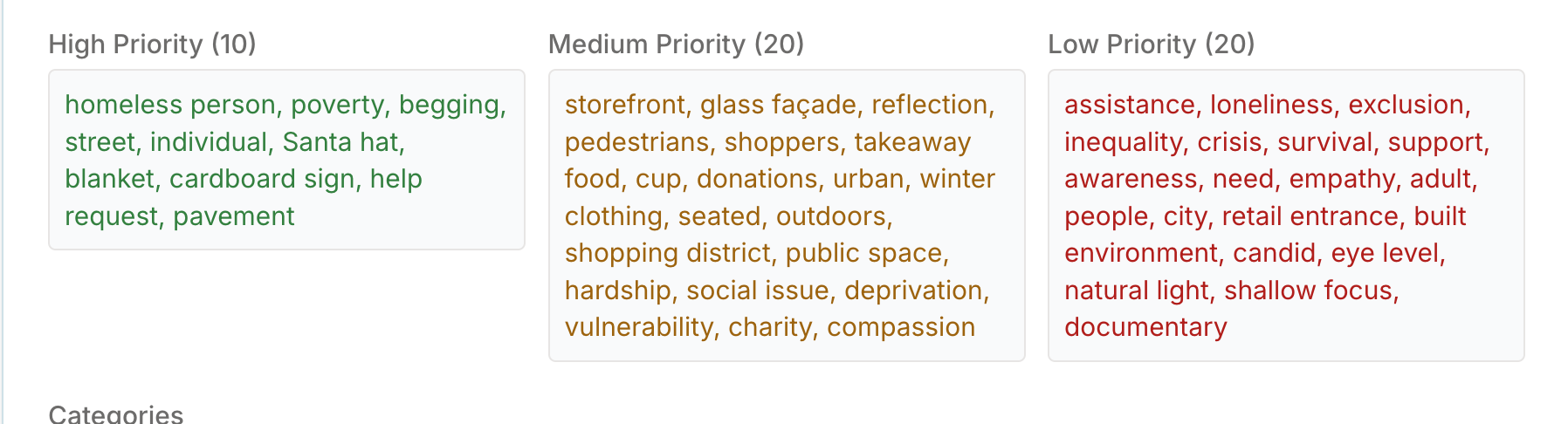
Look at the difference.
The strongest keywords describe the subject and the circumstances that actually define the image.
Retail-related elements can still appear where they genuinely contribute useful information, but they don't get promoted simply because a shop happens to occupy a large part of the frame.
And that's the trap: visual prominence and keyword relevance are not necessarily the same thing.
A shopfront can occupy half the photograph and still be secondary to what the photograph is actually communicating.
But there is an important complication.
Because sometimes the relationship between a homeless person and the retail activity surrounding them is what the photograph is about.
And when that happens, some of those apparently unsuitable keywords can suddenly become relevant.
On one level, many of the ingredients are similar to the previous example.
We have a homeless woman sitting on the pavement in a city-centre retail environment. There are shopfronts. There are pedestrians. There are shoppers.
But this photograph is doing something very different.
The homeless woman isn’t isolated from the retail activity around her. The male shoppers walking past her are an important part of the photograph.
And that changes the metadata.
The photograph creates a striking juxtaposition between people participating in the consumer economy and somebody apparently excluded from it.
The haves and the have-nots occupy the same pavement.
For the people walking past, shopping, enjoying a little retail therapy, may be their story.
For the woman sitting beside them, the circumstances are radically different.
Suddenly conflicting concepts such as:
retail · shopping · shoppers · consumerism · retail therapy · poverty · homelessness · inequality · wealth gap · social inequality · deprivation · juxtaposition
can belong to the same visual story.
And that's an important distinction.
Retail therapy hasn't become relevant simply because there's a shop in the photograph.
It has become potentially relevant because the relationship between shopping, consumption, poverty and inequality is part of what the photograph communicates.
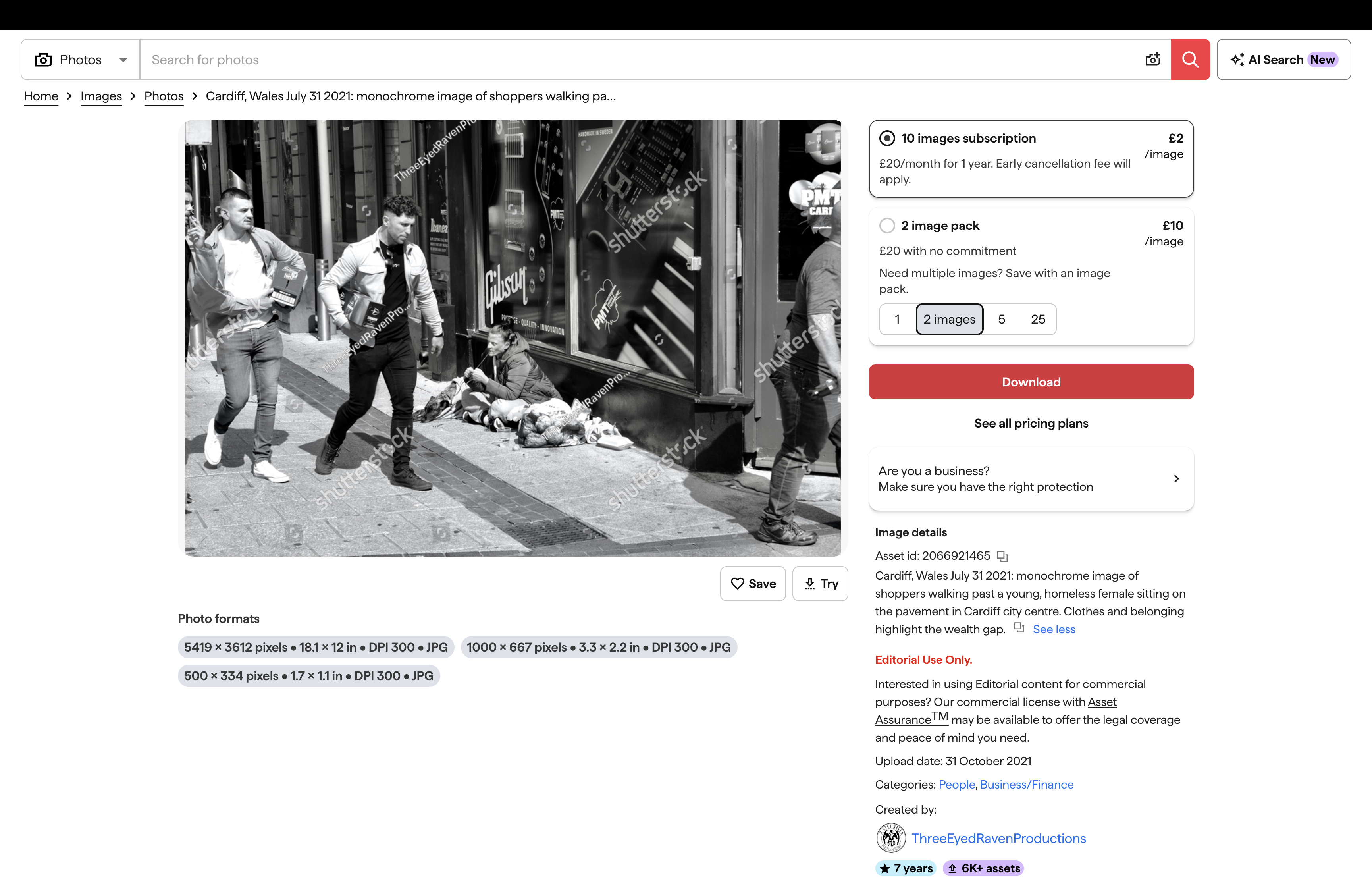
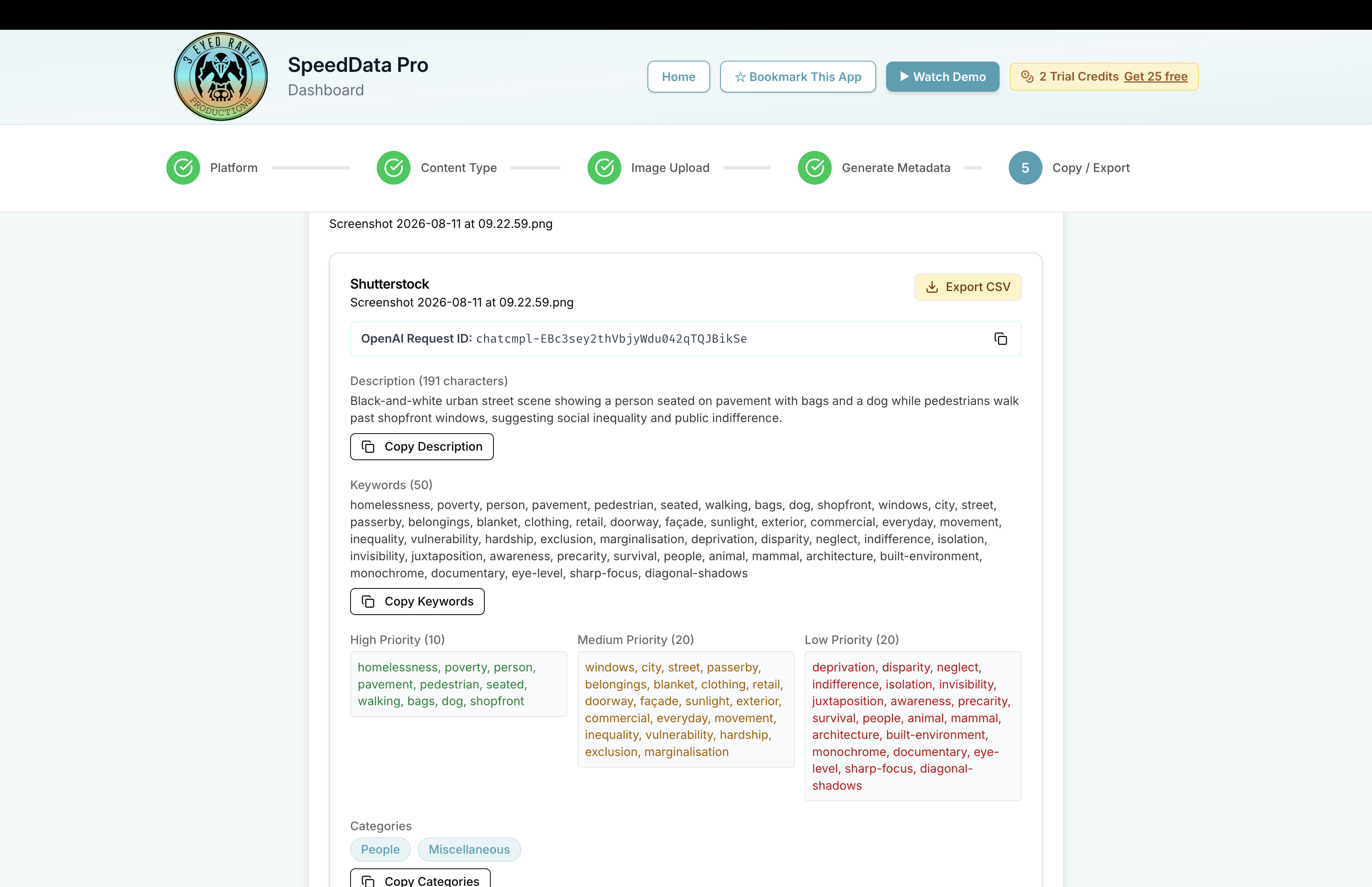
Look at what happens when the photograph is analysed as a whole through SpeedData Pro.
This time the software doesn’t choose between homelessness and retail as though only one story can exist.
It recognises the principal subject, the surrounding retail environment, the people moving through it and the broader social concepts the photograph can reasonably illustrate.
That is very different from simply spotting a shop and generating every shopping-related synonym we can think of.
The software has been trained over and over again to recognise such nuances.
And it is very different from stuffing retail therapy into the previous photograph merely because retail happened to exist somewhere in the frame.
It also analyses each photograph on its own merits.
Retail therapy may not be an appropriate keyword for one photograph of a homeless person. That doesn't mean retail therapy must always be wrong for other photographs involving homelessness.
The relevance and relative importance of any keyword must always be taken in the context of the individual photograph.
That's metadata hierarchy working properly.
This is why conceptual keywords aren’t the enemy.
Irrelevant conceptual keywords are.
A keyword doesn't earn its place because it can somehow be connected to something visible in the frame.
It earns its place when it helps the right buyer find a photograph that genuinely answers their search.
Good Keywords Still Need Judgement
So far, we’ve established three things.
A photograph needs to be discoverable.
Different buyers may search for the same photograph in very different ways.
And more keywords are useful only for as long as those keywords remain relevant.
Now comes the part that used to consume an extraordinary amount of our time.
Actually producing them.
Every photograph needs analysing.
Every image in a batch is slightly different.
Ideally, every keyword list should reflect those differences.
Every term needs considering.
And if you submit to several agencies, as we do, different requirements, preferences and workflows have to be taken into account.
That is where shortcuts creep in.
We knew we were cutting corners.
Copy and paste became a coping strategy.
A keyword list that was excellent for the first photograph gradually became good enough for the fifth.
And perhaps rather questionable by the fifteenth.
We were fed up.
Filling in metadata for thousands of stock assets had become overwhelming, exhausting and, frankly, tiresome.
And keywords were probably the worst part.
Not necessarily difficult.
Just relentlessly repetitive.
Our first attempt at escaping that involved using general AI chats, including ChatGPT, to help create metadata for individual images.
It worked.
But we’d essentially swapped one labour-intensive process for another.
Easier in the sense that we were editing the output rather than creating it from scratch.
But it was still relentlessly repetitive.
The light bulb flickered.
What followed became an 18-month exercise in working out how to take the genuinely useful capabilities of this technology and combine them with what we’d learned through years of actually submitting stock.
Our question became: Could we automate the repetitive work without automating the photographer out of the decision?
That became the most challenging 18 months of our lives.
We are constantly improving our system, especially when we get feedback from other stock contributors. For keywords, we've developed a system where SpeedData Pro produces a full set of relevant keywords for the individual asset and ranks them in order of importance.
The strongest identifiers come first.
Supporting context follows.
Broader conceptual and commercial terms come later.
That matters because a list of 50 equally weighted words isn’t particularly useful.
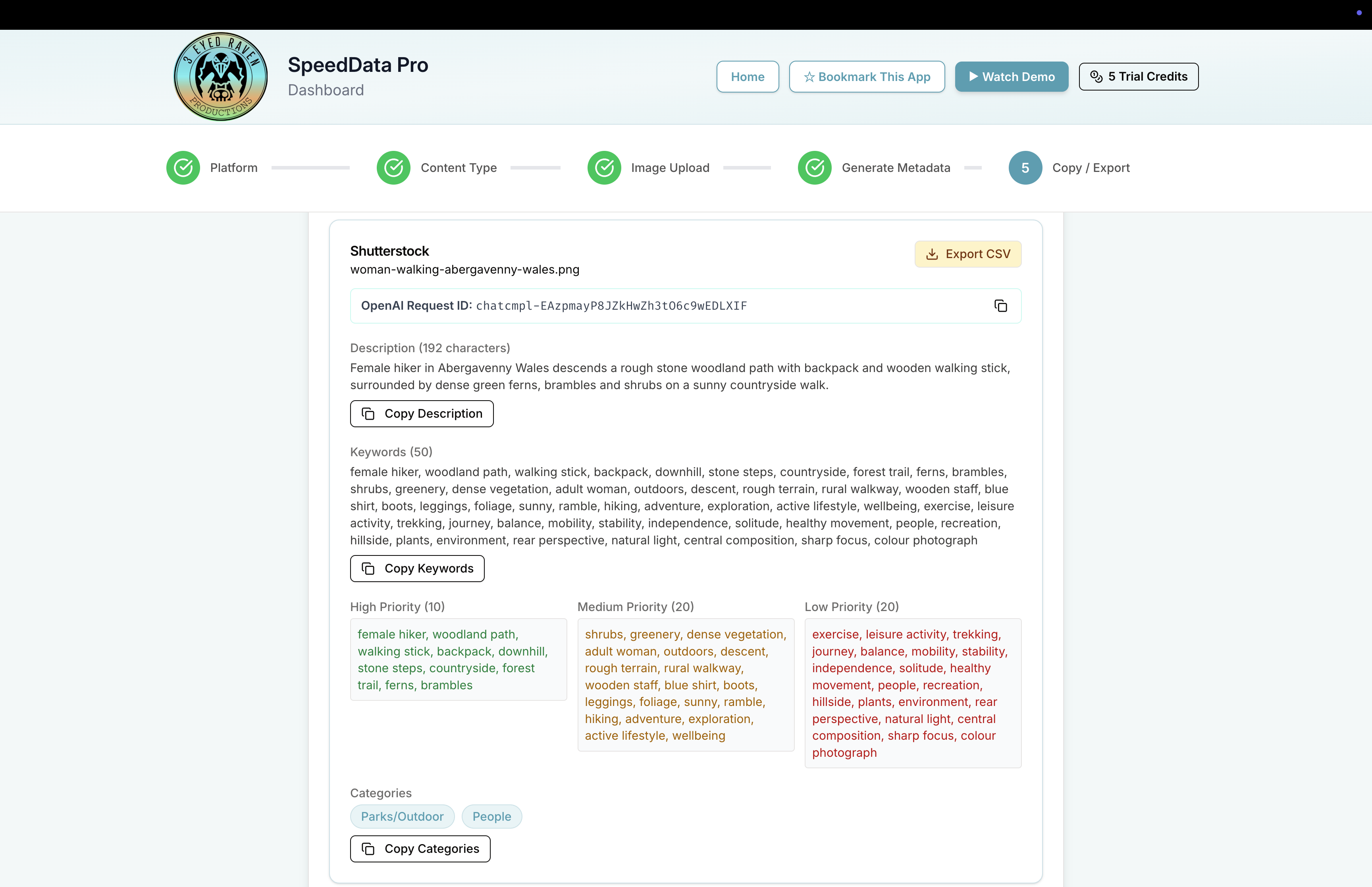
This part matters to me.
SpeedData doesn’t generate the metadata and quietly send it off for submission.
It stops.
It shows you the results on screen.
Those results are presented as a colour-coded ranked list, so you can examine the keywords before anything is exported.
Nothing needs to disappear into a black box.
You can question a word.
Look at number 37 and think: Nope. That’s pushing it.
Or look at number 48 and realise: Actually, yes. I hadn’t thought of that.
That review matters because however sophisticated AI becomes, you still know things about your photograph that a system may not.
You know whether a location is correct.
Whether an interpretation is justified.
Whether a concept genuinely fits.
Whether something that looks like one thing is actually another.
AI can do the heavy lifting.
The photographer still gets the final say.
Once you’ve reviewed the metadata, you export it in the format required for the stock agency , or agencies , you’re submitting to.
If there is something you want to change, this is where you still have control. The exported CSV can be edited before submission, allowing you to remove a keyword, change wording or add information that only you know.
And that is an important final distinction.
Creating good keywords and delivering them appropriately to different agencies are related problems, but they aren’t exactly the same problem.
Different platforms have different requirements and workflows.
The way that metadata needs to be organised, prioritised or exported may change according to its destination.
That’s why our aim with SpeedData has never simply been:
Let AI write some keywords.
It has been to take the repetitive part of a real stock contributor’s workflow, automate what can sensibly be automated, and leave the photographer with the part that actually benefits from human judgement.
That review screen is still one of my favourite parts of the software because it reinforces something I feel quite strongly about:
The Last Five Minutes
And it raises another question which I think is worth investigating further in a future edition of Metadata Matters.
Five years later, this photograph is still perfectly usable. But if I were uploading it today to my portfolios would I keyword it the same way? Absolutely not.
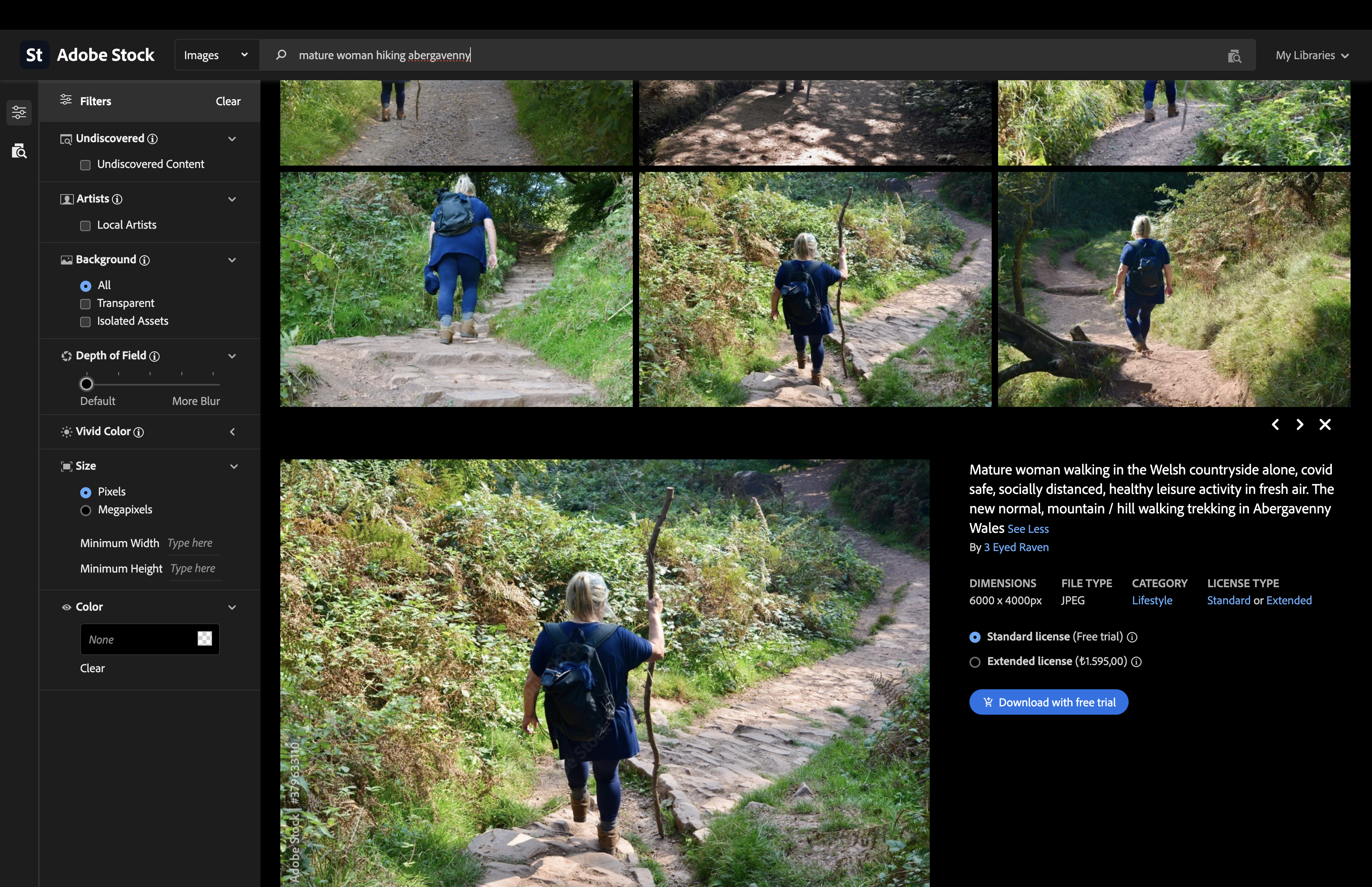
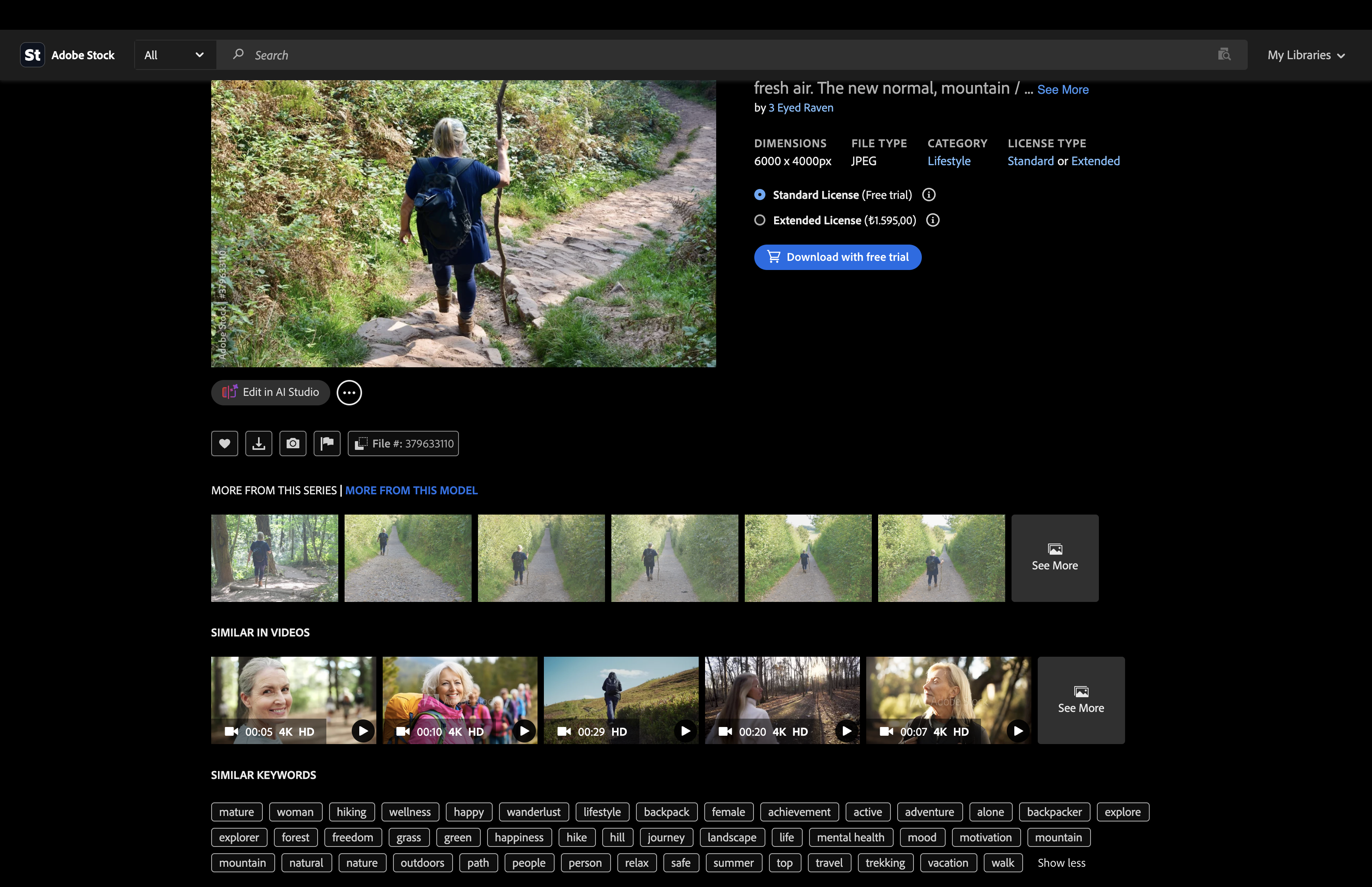
Where an agency allows existing metadata to be edited, there may be real value in revisiting older images, particularly those uploaded when you were less experienced, those tied to trends that have since disappeared, or simply good photographs that have never performed as well as you expected.
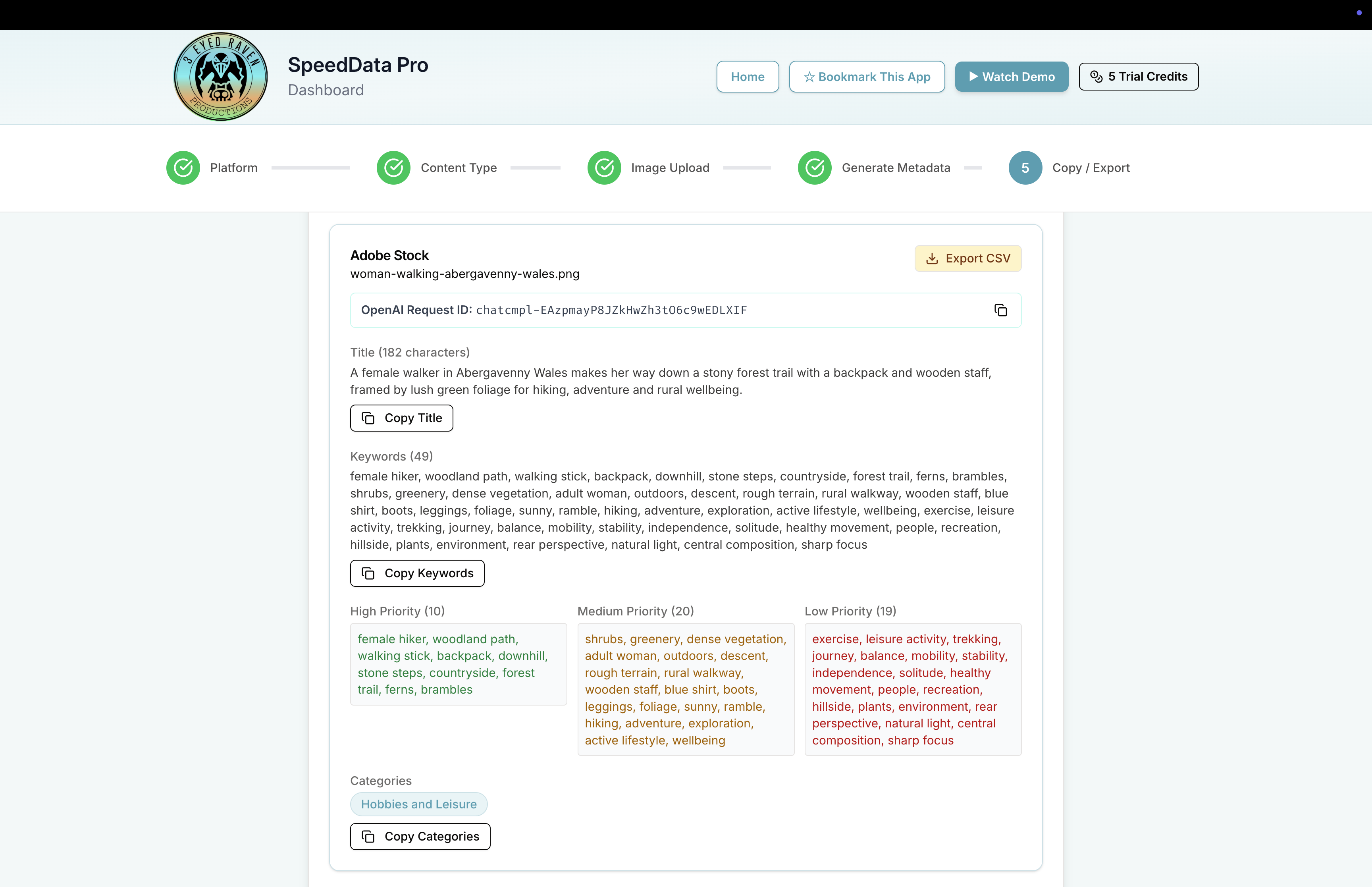
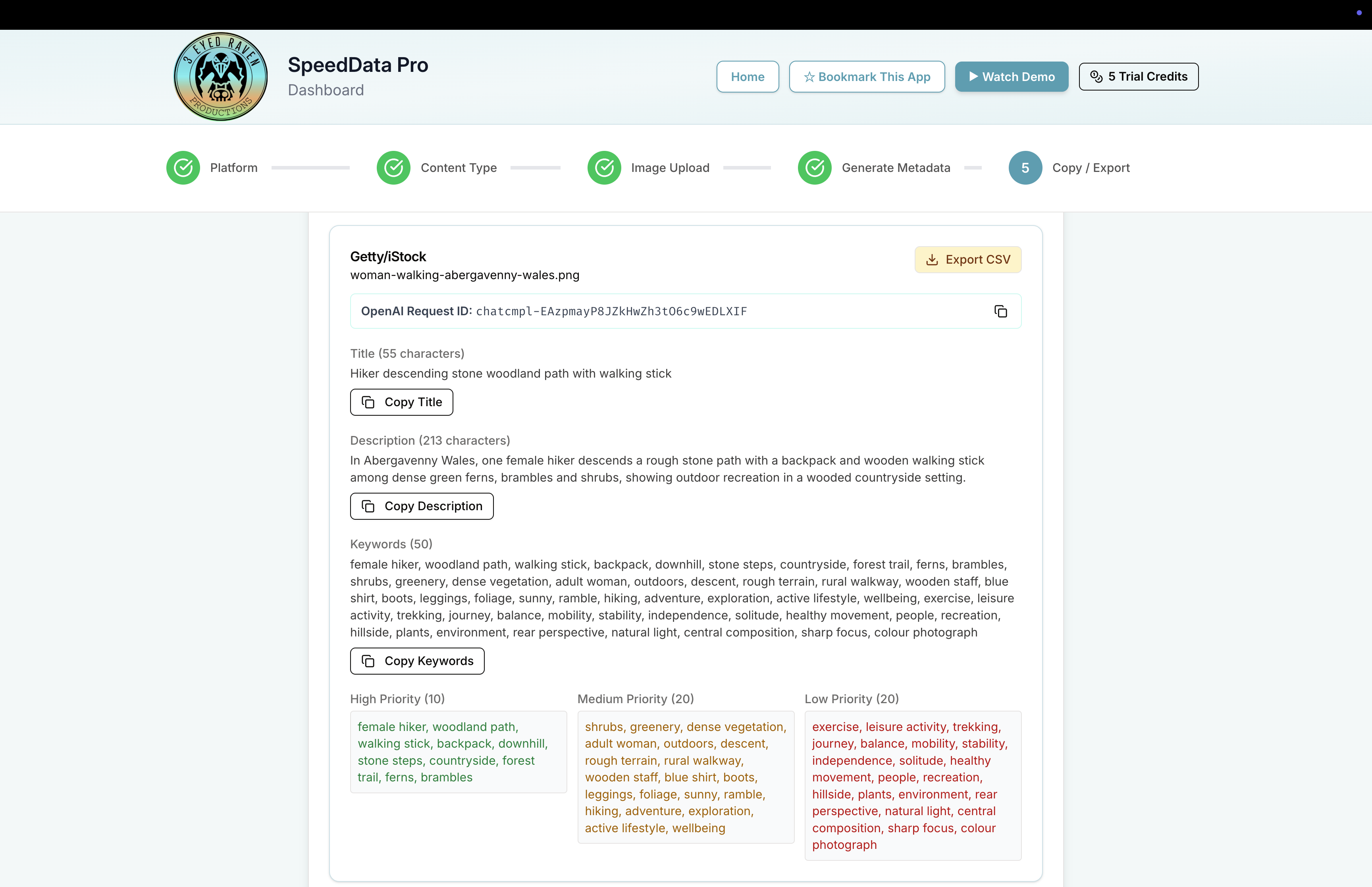

The same photograph. Four agency-ready outputs. SpeedData Pro re-generates platform-specific results for an image created during the pandemic, potentially revitalising the image's commercial potential for 2026.
Finally